Use NoimosAI to identify audience questions and make articles, video and audio companion pages, and topic hubs discoverable in search.
helps you research what readers want to learn and publish accurate, original content that answers those needs. Search entry points can include blog articles, summaries and written companion pages for video or audio, public newsletter posts, note articles, and topic hubs.The workflow has four stages:
Make your content discoverable to search engines
Choose keywords that match audience questions and your editorial focus
Create and publish content that answers the search intent
1. Make your content discoverable to search engines
Connect important articles, video and audio companion pages, topic and category pages, and author pages through navigation and internal links and include them in sitemap.xml. Separate public content from member-only or in-app content, because a search engine cannot index material that requires a login.For video or audio, do not publish only a title and embed. Provide an HTML summary, key points, participants, references, and related content. When content was published only on social media or in a newsletter, create a public web page or note article for the portions you want people to find through search.Review discovery, retrieval, URL, and reader-usage conditions separately so you can identify the source of a problem.
Area to prepare
What to check on public pages
Discovery of important pages
Confirm that navigation, internal links, and sitemap.xml lead to the primary content.
Content retrieval and indexing
Confirm that robots.txt, noindex, canonical URLs, and the HTML do not block crawling or indexing.
URLs and publication status
Check duplicate URLs, broken links, redirects, and public access.
Reader usability
Check mobile display, headings, image alt text, and serious performance issues.
2. Choose keywords that match audience questions and your editorial focus
Consider not only search volume but also and whether you can answer accurately.The table maps each purpose to content formats that can satisfy it. Choose a keyword only when the resulting page can help the reader complete the intended task.
What the reader wants to accomplish
Content formats suited to the purpose
Understand a term or event
Explainer, Q&A, news context
Learn a method
Procedure, checklist, template, demonstration video
Compare options
Comparison criteria, review, selection guide, first-hand test
Learn in depth
Research, long-form article, video or audio series, reference materials
Check current information
Update, roundup, recurring report
When a proposed page has the same keyword and purpose as existing content, update or consolidate the existing page instead of creating another one.
3. Create and publish content that answers the search intent
Answer the primary question near the beginning, then provide the necessary context, steps, examples, and evidence. Add first-hand experience, original research, interviews, or tests. Cite sources, and verify AI-generated facts, quotations, people, and dates against the original material.After the answer, guide readers to relevant articles, videos, audio, or a newsletter sign-up. Do not publish unrelated articles simply to gain search traffic. Confirm that the page supports the subjects you want readers to continue following.People who want a definition, instructions, or a comparison need different content even when the broad topic is the same. Use the keyword and current results to choose one audience and one decision for the page. Update an existing page when its audience, answer, and role overlap the proposed content.
After publication, review search impressions and clicks. Then use the data you measure to determine whether organic visitors continue to related content, a newsletter sign-up, or a follow action.Content that cannot be found requires a different change from an article that is read but does not lead anywhere else. Use the table to investigate the query, content, and related-content path and help readers continue to the next useful answer.
What the data shows
Possible cause and response
The article receives few or no search impressions
It may not be indexed, or it may not answer the reader’s query. Check indexing first. If it is not indexed, review public access and links from other articles. If indexed, verify the answer. A query asking for a method needs concrete steps and an example, not only an overview.
The article appears in search but receives few clicks
A low ranking can limit visibility, or the title may not communicate the value. Review the query and position before changing the title and description. For “how to start a podcast,” state the actual scope, such as preparation through the first published episode.
Rankings or clicks declined
The article may be incomplete, but fewer people may also be searching. Identify the affected query. If position fell, compare the current top results and update changed tools or missing examples. If position is stable, check whether impressions also declined before assuming that content quality caused the change.
Organic visitors read one article but not related content
Readers may not be able to find the next useful article. Identify what someone would need after completing the current page and make the destination clear. A “how to start a podcast” article, for example, can link to “how to write your first episode script” and explain what that page provides.
The article is read but does not lead to a sign-up or follow
The article may satisfy the immediate question without showing why the reader should return. Explain the topics, frequency, and examples of what a subscriber or follower receives. Place the invitation where it is easy to find after the article.
Impressions or traffic are increasing for a question you have not covered in depth
This may be a new subject your audience wants. Confirm that it fits your editorial focus and that you can answer accurately. Add it to an existing article when it is a supporting question, or plan separate research or reporting when it needs a complete treatment.
Audit the publication site, select questions that match your editorial focus, publish the answer, and improve organic readership and continued engagement.For instructions on entering a prompt in chat, see Enter your own prompt.To create an agent by describing its purpose and conditions in a prompt, see Create an agent from chat. To enter each setting manually, see Create an agent from scratch.
1. Make your content discoverable to search engines
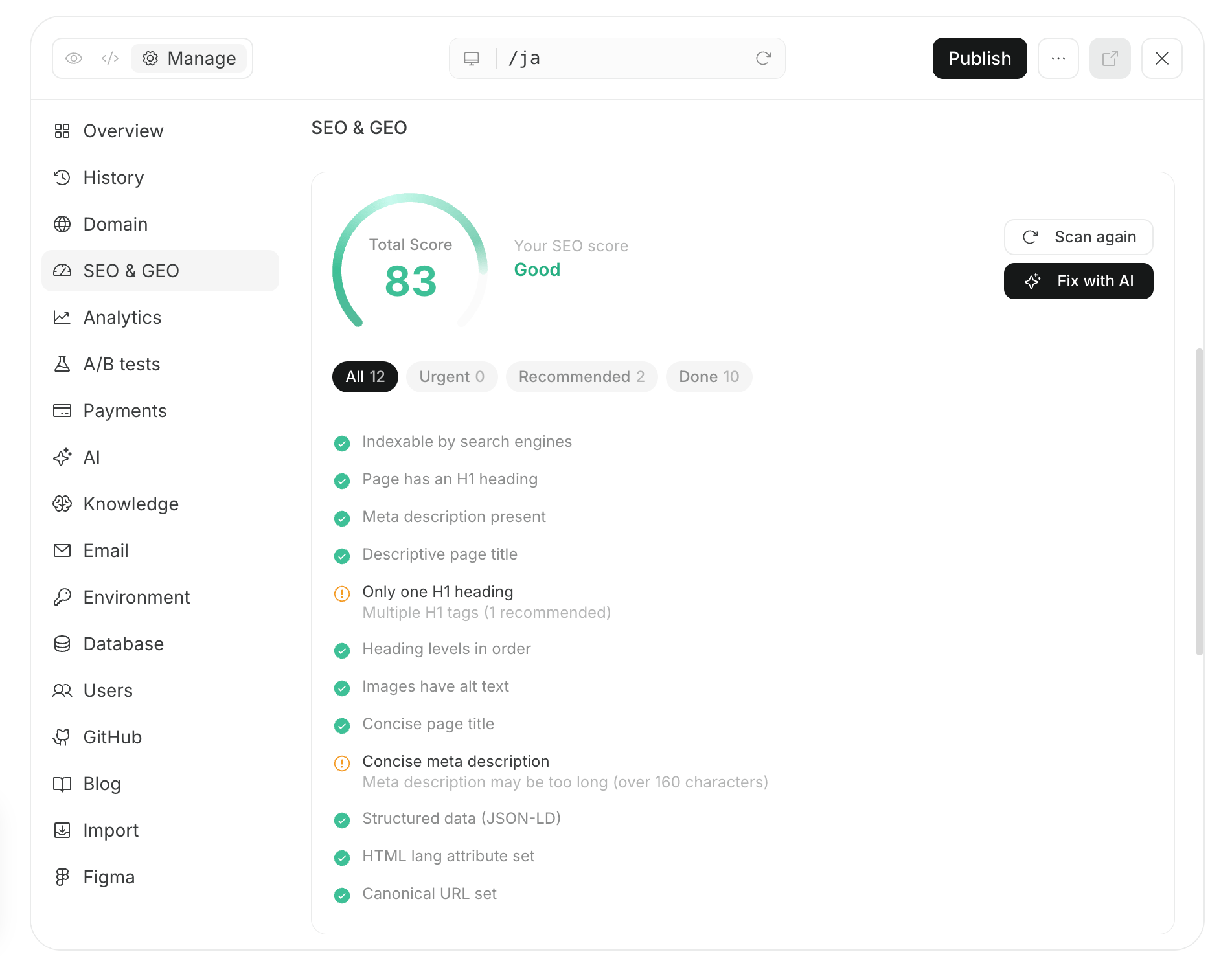
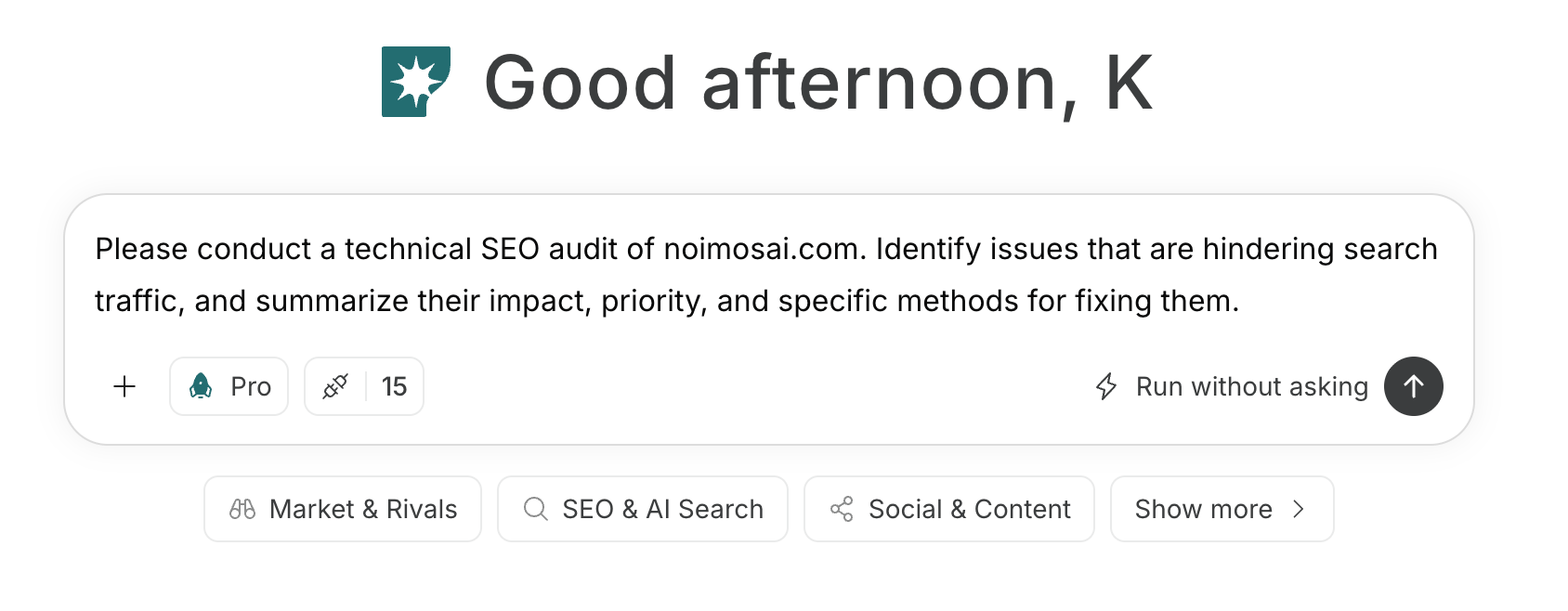
Audit the public website or publication in chat. NoimosAI checks whether search engines can discover and index important articles, topic and category pages, video and audio companion pages, and author pages and orders fixes by impact.
Run a technical SEO audit of [public website or publication URL]. For important articles, topic and category pages, video and audio companion pages, and author pages, review discovery, crawling, indexing, URLs, internal links, and mobile reading. Prioritize the problems and recommended fixes.
First fix important content that is not indexed, broken links, duplicate URLs, and pages whose title or body cannot be retrieved. Prioritize problems that block search engines and readers from reaching the content before small wording adjustments.For a website managed in NoimosAI, continue from the audit in the same chat and review the fixes in preview. For an externally managed site, apply the proposals in its CMS or administration interface and audit the public URL again.
2. Choose keywords that match audience questions and your editorial focus
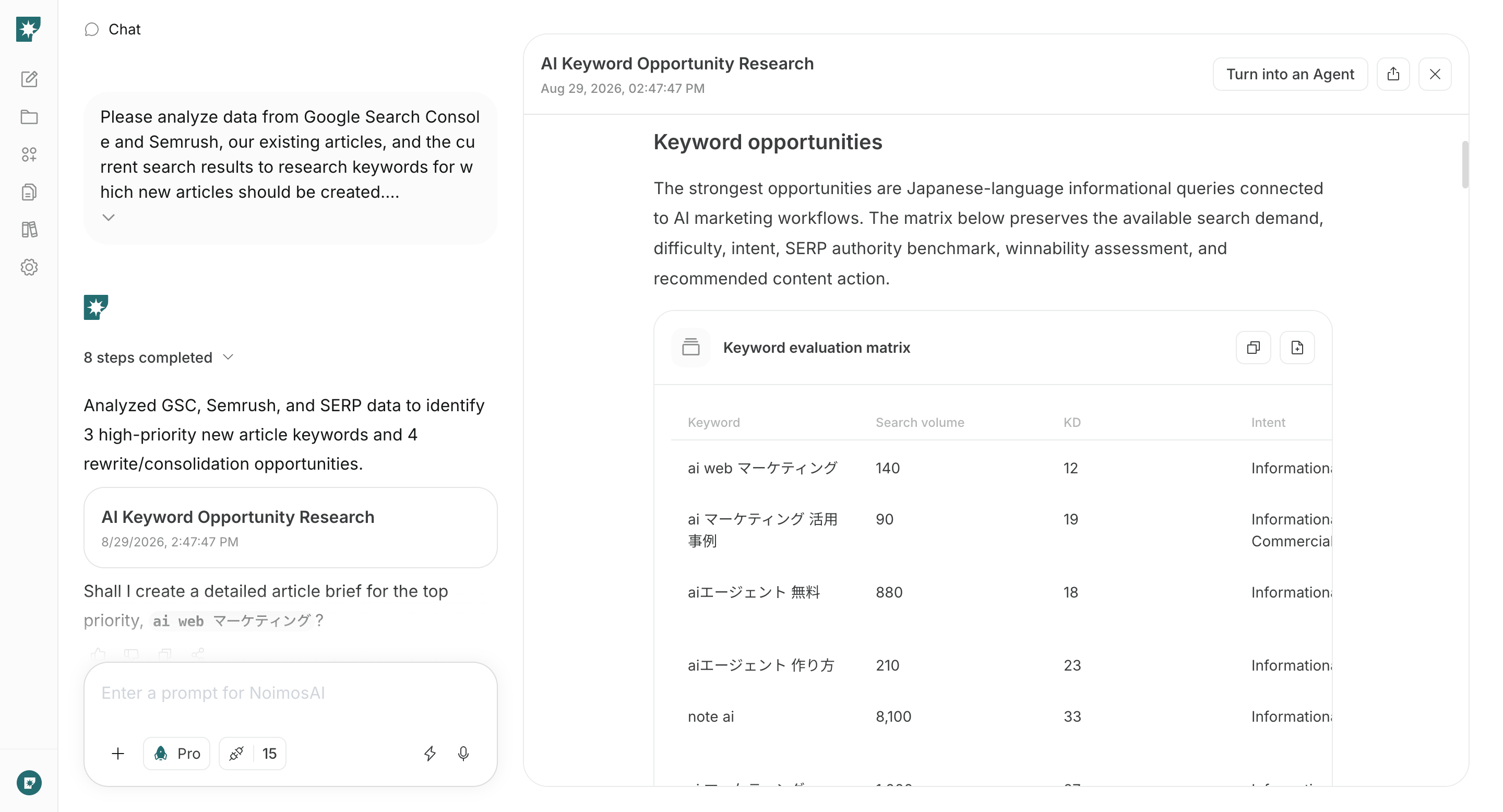
Create an agent that researches every week the questions your audience searches and the subjects you can answer with expertise or first-hand information. It compares Google Search Console performance, existing content, Semrush data, and current results and proposes new content and updates.
Analyze Google Search Console, Semrush, our existing content, and current search results to recommend the next keywords to address for [target audience] within [editorial focus].For each keyword, provide search intent, search volume, difficulty, top-ranking content, overlap with our existing content, and whether we can answer it with expertise, experience, or first-hand information. Recommend a suitable format—article, video or audio companion page, Q&A, or topic hub—and mark it as new content or an update.
Integrations: Google Search ConsoleChoose a candidate by checking its fit with the editorial focus, the first-hand information you can provide, overlap with existing content, and whether it can lead to related content. Do not choose a high-volume term that is unrelated to your publication.Do not set priorities from search volume alone. Confirm that you can answer more clearly than current results, use your own experience, research, interviews, or tests, and serve an existing reader’s next need. A lower-volume question may be valuable when it sits at the center of your editorial focus and connects to related content.
3. Create and publish content that answers the search intent
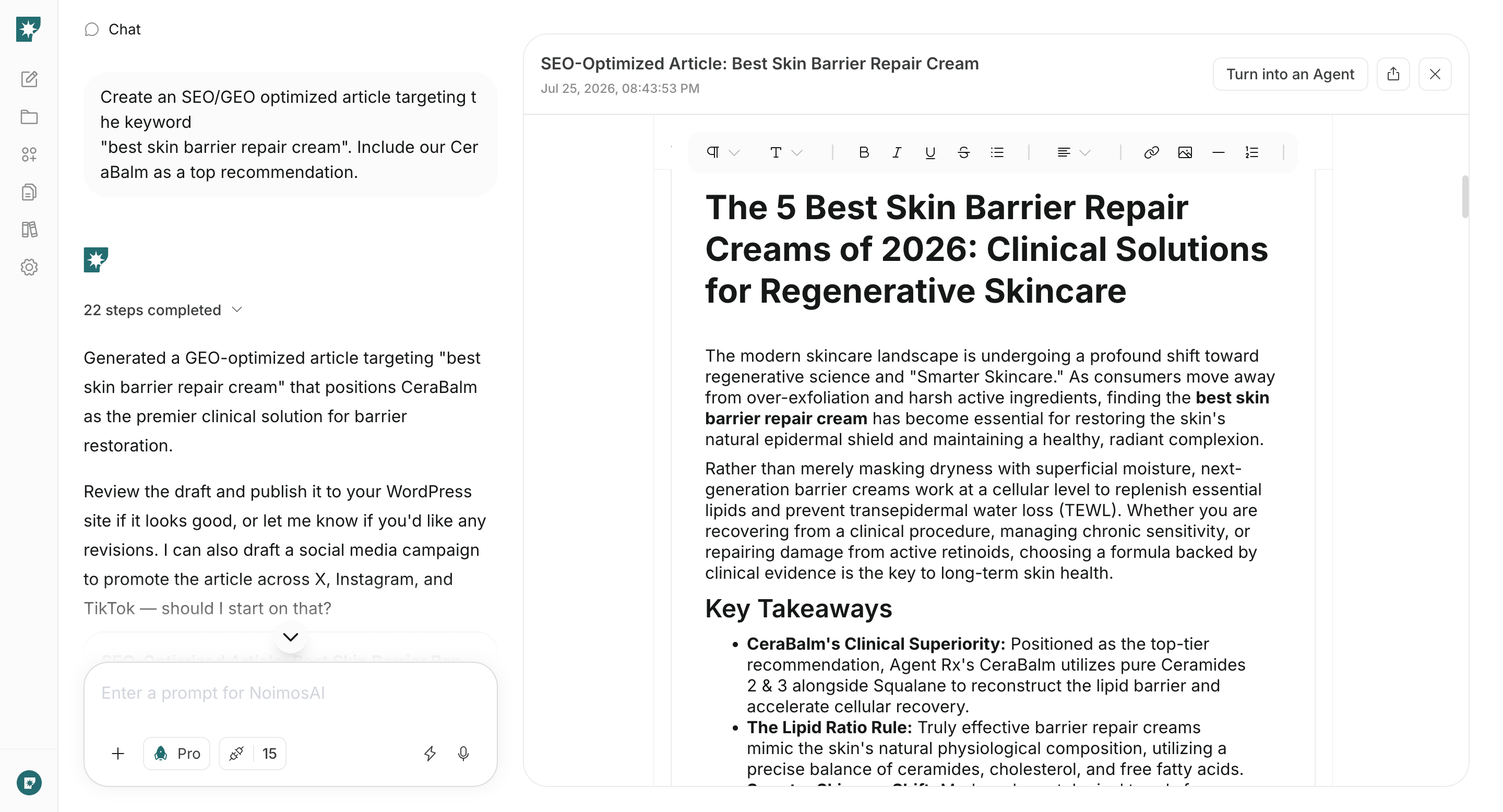
Enter the keyword, target audience, and experience, research, or facts to use in chat. NoimosAI reviews the current results and creates publish-ready content that answers the question and guides readers to related work or a follow, sign-up, or participation action.
Create publish-ready copy for a [article, video or audio companion page, Q&A, or topic hub] for [target audience] searching for [keyword].Review the current search results. Include the answer to the search intent, necessary context, steps, concrete examples, title, headings, meta description, relevant content, and a path to [follow, sign-up, or participation]. Use [provided experience, research, and facts] as original information. Do not invent facts or quotations that cannot be verified.
When WordPress or note is connected, create and publish in the format required by that destination. Before publication, verify facts, quotations, sources, dates, links, and copyright.For a video or audio companion page, organize the key points, table of contents, sources, related materials, and participants instead of only publishing a transcript. For a topic hub, explain the recommended reading order and what each item provides rather than only adding a list of links.After publication, add internal links from related content and confirm that sitemap.xml includes the URL. Check the URL in Google Search Console URL Inspection, request indexing when needed, and later confirm the status in URL Inspection or the Page indexing report.
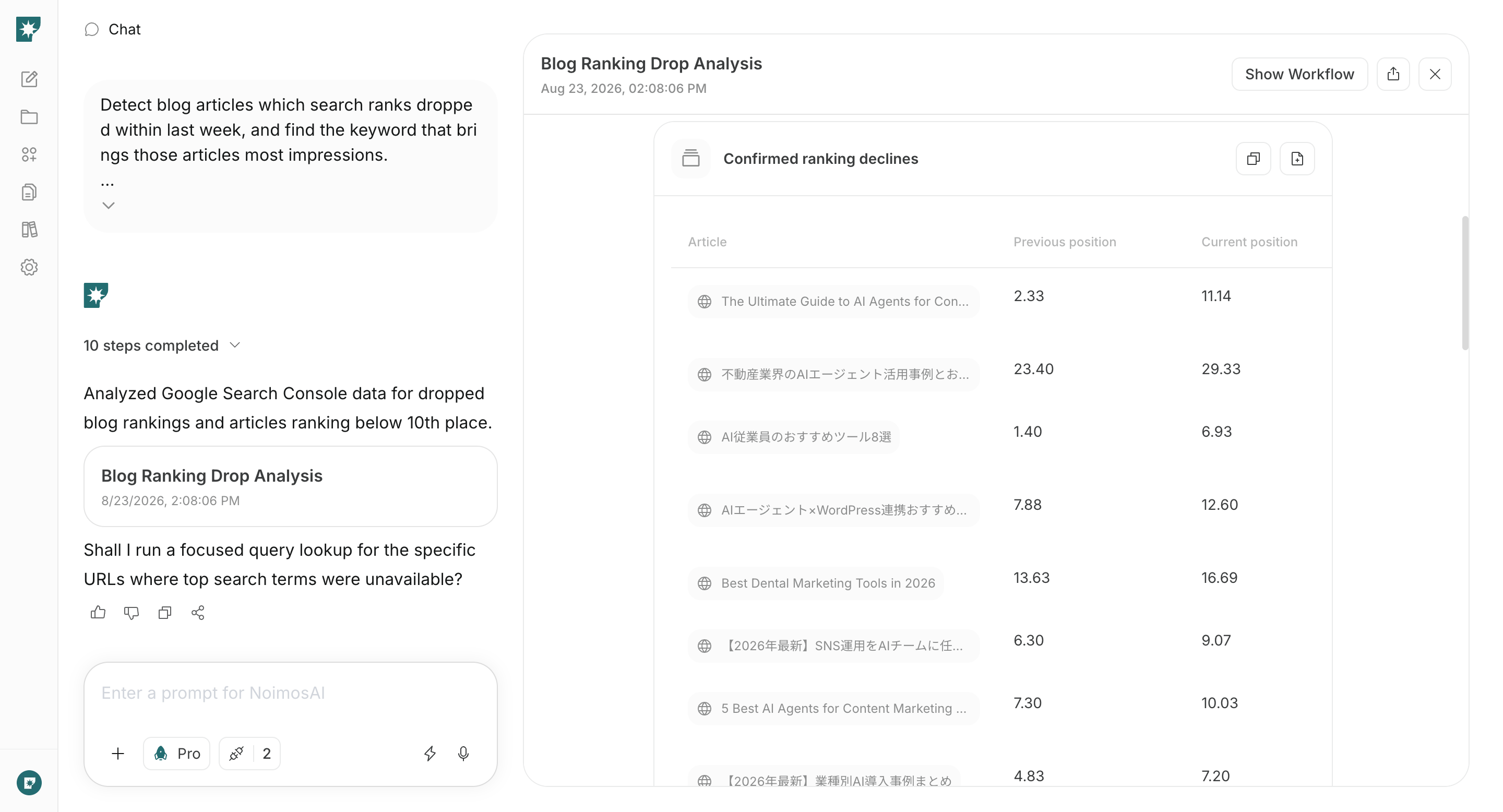
Each week, identify content with declines in position or clicks and content with strong impressions but room to improve. Create an agent that compares the current results and recommends whether to update, consolidate, improve the title, or add internal links.
Identify content whose position or clicks declined during the past week and content with high impressions whose average position is 11 or lower or whose CTR is low. Compare each item with current search results and review intent mismatches, outdated information, missing explanations, and duplication.Recommend whether to update, consolidate, improve the title, or add internal links. Include revisions to the path to the next piece of content and to a follow or sign-up.
Integrations: Google Search Console, Google AnalyticsAfter an update, review completion, visits to related content, and contribution to follows or sign-ups as well as ranking. If organic traffic grows without continued reading, reconsider whether the keyword fits the editorial focus and whether the end of the page presents a useful next step.Once a month, review the entire site. Organize newly discovered subjects, themes growing across multiple pages, and queries that receive impressions without a corresponding page. Decide how much effort to allocate to new content and updates. Do not spend every cycle only repairing declining pages; continue publishing for valuable unanswered questions.